



Claude code skills were introduced by Anthropic in October 2025 to package instructions, scripts, and resources into reusable units that load only when relevant. This AI platform reduces the need to reconstruct context in each interaction and enables workflows to be defined once and executed consistently across tasks. The approach is particularly applicable in coding, testing, and structured analysis, where repeated prompting may result in differences in output quality.
This blog examines how these Claude code skills operate, how they should be designed, and how to apply without introducing inconsistency or unnecessary overhead.
Defining a Claude Code Skill as an Execution Unit
Teams that rely solely on prompt-based AI workflows face clear limitations, including lack of secure execution, API access, state management, and orchestration.
Claude Code Skills solve this by enabling real actions: connecting to systems, handling authentication, and running structured workflows reliably.
It operates as a structured execution unit that packages workflow logic into reusable modules. Instead of embedding instructions in large prompts, logic is defined once and reused across tasks.
Each skill specifies how a particular class of tasks should be performed. It includes metadata for discovery, explicit operational steps, domain constraints, supporting reference files, and executable scripts where required.
This structure shifts workflow logic out of prompts and into versioned units. It reduces prompt size, avoids duplication, and provides clearer control over how the agent behaves during execution.
Each skill exists as a directory anchored by a SKILL.md file. The file defines the skill’s purpose and step-by-step execution logic. Claude evaluates the metadata first to determine relevance. When a task matches, it loads the full instructions along with any associated resources. Skills can include scripts that run in a sandboxed environment. This allows Claude to execute deterministic steps, interact with external systems, and manage multi-step workflows in a controlled manner.
Skills are also composable. Claude can combine multiple skills within a single task, enabling more complex workflows without increasing prompt complexity. This keeps execution structured and easier to scale.
SKILL.md started as Anthropic’s format for Claude Code and is now an open standard called Agent Skills, adopted by multiple AI coding tools including OpenClaw (247K+ GitHub stars), Codex CLI, Cursor, and Gemini CLI. This means skills are portable: build once, use across agents.
A minimal SKILL.md file:
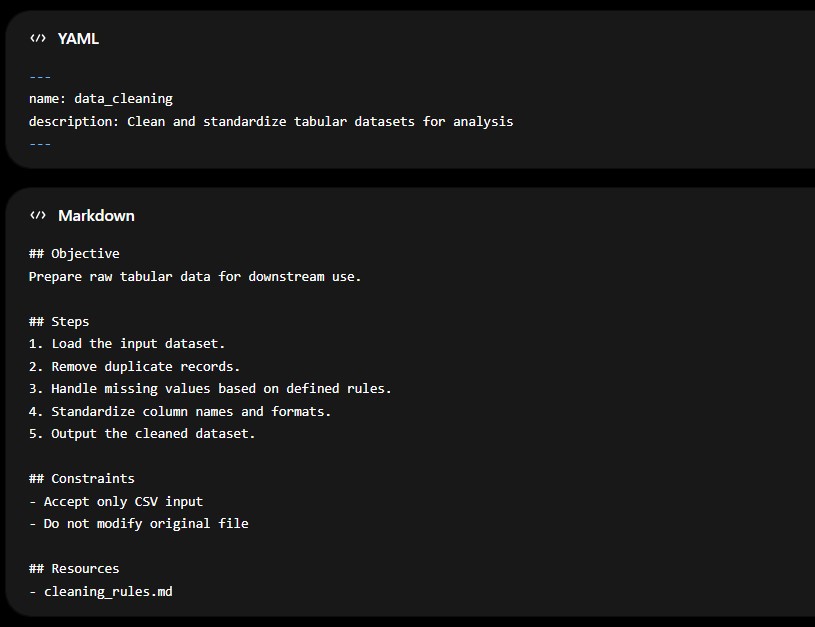
Capability vs Preference: Two Distinct Roles in Skill Design
Claude skills serve two different purposes, and separating them improves design decisions.
Capability uplift skills extend what Claude can execute. These are required when a task cannot be completed reliably using default capabilities. Examples include structured web scraping, generating PDFs, running browser-based tests, or interacting with external systems. The limitation in these cases is execution.
Encoded preference skills define how a task should be performed. The model already understands the task, but outputs may vary in structure or quality. These skills enforce consistency. Examples include contract review formats, reporting structures, and code review standards.
A simple diagnostic helps identify which type is required. If outputs vary, feel generic, or fail to reflect expected patterns despite clear instructions, the gap is likely a missing encoded preference; if the task itself cannot be completed reliably, the gap is a missing capability.
How a Claude Skill Works
A Claude skill is a folder containing a SKILL.md file. This file defines when the skill should activate and how the task should be executed. Each skill is organized as a self-contained directory. Supporting files such as scripts, templates, or references must be explicitly linked within it.
A minimal example:
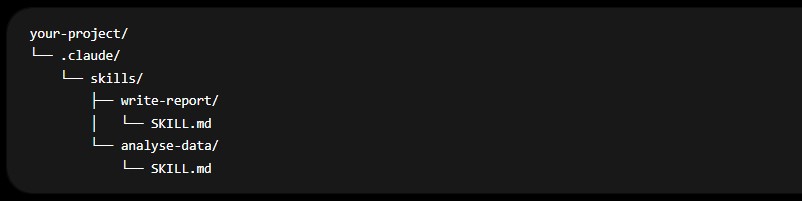
The description determines whether the skill is triggered. Claude compares user input against this field to decide whether to load the skill.
Only relevant skills are loaded during execution. This prevents unnecessary instructions from occupying the context window.
- Structure and Storage
Folder Structure
Each skill resides in its own directory:
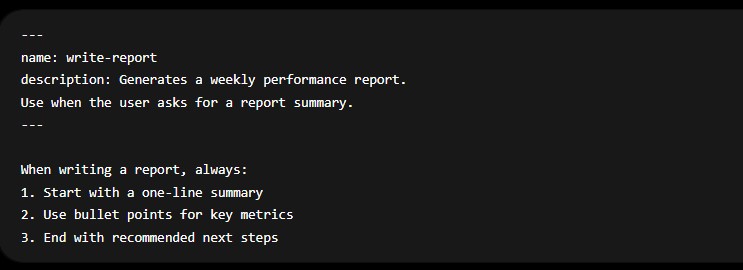
Each subfolder contains a single SKILL.md file. Additional files can be included if referenced.
Claude monitors this directory. Changes to SKILL.md apply immediately without restarting the session.
- Storage Locations
Skills can exist in two scopes:
- Project-level skills: Stored in .claude/skills/ within a repository and shared across collaborators
- Global skills: Stored in ~/.claude/skills/ and available across all projects
Pre-built skills provided by Anthropic are installed alongside custom skills and follow the same structure.
Claude continuously monitors these directories. Any updates to a skill take effect immediately, without requiring a restart. This enables rapid iteration and fine-tuning in active workflows.
- Skill Discovery and Triggering
Triggering depends on how closely the description matches natural user requests. Claude selects skills based on the description field. This makes description design critical.
- Vague descriptions lead to missed triggers
- Overly broad descriptions cause incorrect activation
A precise description improves reliability. For example:
- Ineffective: “helps with documents”
- Effective: “Use when the user asks to generate a weekly or performance report”
Building a Claude Skill
The mechanics of building a skill are straightforward, but effectiveness depends on how precisely each step is executed.
Step 1: Create the directory
Define a dedicated folder for the skill, ensuring the name reflects a single, well-defined purpose.
Step 2: Write the SKILL.md file
This includes:
- A clearly scoped description that determines when the skill should activate
- Step-by-step instructions that define how the task should be performed
- Examples, where necessary, to remove ambiguity
Step 3: Test with real inputs
Use natural, user-like prompts rather than artificial test cases. This helps validate both triggering behavior and output quality.
Step 4: Refine iteratively
Adjust descriptions and instructions based on observed gaps. Small refinements, especially in phrasing, often lead to significant improvements in performance.
10 Examples of High-Impact Claude Skills
Before diving into the examples, it helps to clarify a few terms used throughout:
- npx: A Node.js package runner that allows you to execute tools directly without installing them globally. It’s commonly used to run CLI-based utilities on demand.
- skills add: A command used to install and register a skill into your Claude Code environment from a repository or package source.
- CLI (Command Line Interface): A text-based interface where commands are executed to install, configure, or run tools.
- Skill: A modular capability or workflow extension that enhances Claude’s functionality, either by adding new execution abilities (Capability Uplift) or enforcing structured ways of working (Encoded Preference)
The following 10 examples illustrate how this plays out across different use cases:
1. Firecrawl Skill + CLI
The Firecrawl skill enables structured web data extraction in environments where default tools fail to handle JavaScript-heavy sites or return unusable HTML. It integrates a CLI designed for agent workflows, allowing Claude to retrieve, process, and store data in files rather than loading raw content into context. This improves both reliability and token efficiency. It is a Capability Uplift skill, as it enables web scraping workflows that are not reliably achievable otherwise.
Install:
2. GStack
GStack is an open-source toolkit created by Garry Tan that structures Claude Code into multiple engineering roles, including design, QA, and code review. Instead of extending a single capability, it models a full team workflow. It combines Capability Uplift (browser testing, QA execution) and Encoded Preference (structured review and decision-making processes).
Install:
3. Frontend Design
The Frontend Design Skill guides Claude to create distinctive, production-grade interfaces designed to avoid generic “AI slop” aesthetics. Anyone who has used Claude Code for UI generation has likely seen the pattern: Inter font, purple gradients, card layouts, and safe neutral palettes. The output is functional, but often visually indistinguishable from other AI-generated interfaces.
The Frontend Design skill addresses this by pushing Claude to establish a deliberate visual direction before generating code.
Install:
4. Superpowers
Superpowers is a composable framework that structures the software development lifecycle into defined stages, including brainstorming, planning, execution, and review. It uses subagent-driven execution to isolate tasks and reduce context drift. The framework combines Capability Uplift (multi-agent orchestration) with Encoded Preference (enforced development methodology).
Install:
5. Vercel Web Design Guidelines
This skill audits UI code against a comprehensive set of accessibility, performance, and UX rules. It retrieves the latest guidelines and evaluates code accordingly, producing structured outputs for review. It functions as an Encoded Preference skill by applying consistent UI/UX standards defined by Vercel.
Install:
6. Vercel React Best Practices
The React Best Practices skill enforces a prioritized set of performance optimization rules for React and Next.js. It addresses high-impact issues such as request waterfalls and bundle size before lower-level optimizations. This ordering ensures efficient performance improvements and reflects an Encoded Preference approach to engineering standards.
Install:
7. Vercel Composition Patterns
This skill improves component architecture by replacing non-scalable patterns, such as excessive boolean props, with structured composition techniques. It introduces compound components, context-based state management, and clearer APIs. It is most relevant in shared component systems where maintainability is critical.
Install:
8. Document Skills (PDF, DOCX, XLSX, PPTX)
These official skills from Anthropic enable Claude to create, edit, and parse real document files using underlying scripts. They extend execution beyond text generation into structured document workflows, including spreadsheets and presentations. This makes them Capability Uplift skills for document-heavy operations.
Install:
9. Webapp Testing
The webapp-testing skill enables browser-based testing through Playwright. It allows Claude to interact with live applications, execute user flows, and detect runtime issues that static analysis cannot capture. This is a Capability Uplift skill focused on real-time validation.
Install:
10. Trail of Bits Security Skills
Developed by Trail of Bits, this collection integrates structured security analysis workflows into Claude Code. It includes static analysis tools such as CodeQL and Semgrep, along with methodologies for vulnerability detection and variant analysis. These are Capability Uplift skills that extend Claude’s ability to perform security audits.
Install:
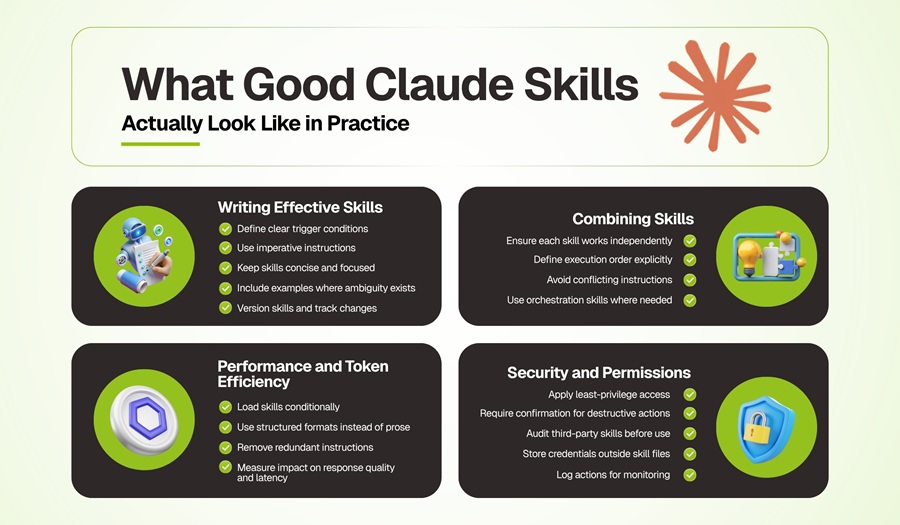
Where Claude Skills Break, and Why
Here’s what goes wrong:
- Skill not triggering: Align the description with natural queries; check visibility via /context.
- Incorrect triggering: Make descriptions distinct to avoid overlap.
- Triggers too often: Narrow the description or require manual invocation.
- Instructions not applied: Simplify and split large skills.
- Changes not reflecting: Verify edits in the correct directory.
- Supporting files ignored: Reference them in SKILL.md.
- Skills not visible: Check /context; limits may exclude some skills.
Conclusion
Claude Code skills define how an AI system executes tasks within real environments. They structure the reasoning. Capability uplift expands what the system can do. Encoded preference ensures that what it does is consistent, predictable, and aligned with defined standards.
The difference between inconsistent output and reliable execution rarely lies in the model itself. It lies in how precisely the system around it is designed. When skills are built with clear triggers, focused instructions, and deliberate composition, Claude shifts from a responsive assistant to a dependable operational layer.
Is Your Credential Working for You?
Use this checklist to see if your certification is truly adding value to your resume and career.
Frequently Asked Questions
How do Claude skills simplify prompting?
When skills are well-defined, prompts can remain simple. The execution logic is already encoded within the skill.
How do you integrate Claude into a development workflow?
Define project-level skills for recurring tasks such as code review, testing, and deployment. Combine them with orchestration patterns to ensure consistent execution across the workflow.